Best PC Settings for 144 FPS at 1080p, 1440p, and 4K (2026)
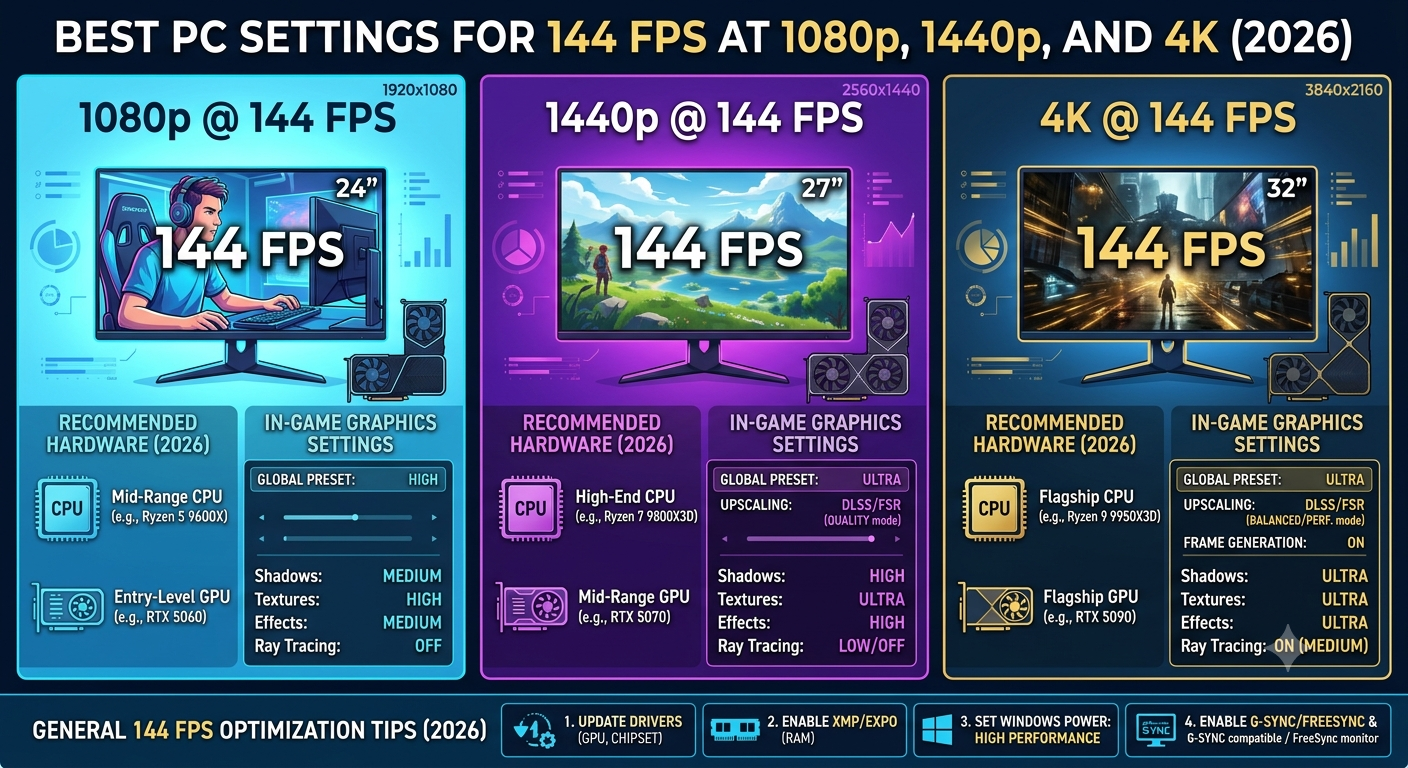
Achieving 144 FPS requires very different hardware and settings at each resolution. At 1080p, a mid-range GPU paired with a strong CPU can reach 144 FPS at ultra settings in most titles but the CPU becomes the bottleneck more readily. At 1440p, a high-end GPU is needed to consistently hit 144 FPS at high settings, and the CPU matters less. At 4K, 144 FPS is achievable only with the RTX 4090 or RX 7900 XTX and only in less demanding titles or with upscaling assistance.
Use the FPS calculator to check whether your specific hardware can hit 144 FPS at your target resolution before adjusting settings or buying new components.
Why 144 FPS Is the Target for Most Gamers
144 FPS precisely matches the most widely used high-refresh-rate monitor tier (144Hz). At this frame rate, motion is noticeably smoother than 60 FPS, and the GPU's output matches the display's refresh rate without adaptive sync being required for a locked experience. For competitive gaming, 144 FPS represents the minimum threshold where most players report feeling a meaningful improvement over 60 FPS in reaction time and motion clarity.
144 FPS at 1080p: Most Achievable, but CPU-Sensitive
1080p is where 144 FPS is most achievable with mid-range hardware but it's also where the CPU is most likely to be the bottleneck preventing you from hitting it consistently.
Hardware that reliably hits 144 FPS at 1080p (most titles, high-ultra settings):
- RTX 4070 + Ryzen 7 7800X3D or Core i7-14700K
- RTX 4060 Ti + Ryzen 7 7800X3D (in most titles)
- RX 7800 XT + Ryzen 5 7600X or better
Settings to prioritise for 1080p 144 FPS:
| Setting | Impact on FPS | Recommendation |
|---|---|---|
| Resolution scale | Very High | Keep at 100% native unless frame rate falls short |
| Anti-aliasing | High | Switch from MSAA/SSAA to TAA or DLSS/FSR — massive FPS recovery |
| Ray tracing | Very High | Disable or set to lowest level; enable only if 144 FPS is comfortably met |
| Shadow quality | High | Set to Medium or High; Ultra shadows provide minimal visual gain for large FPS cost |
| Ambient occlusion | Moderate | Set to Medium; often imperceptible difference between Medium and Ultra |
| Draw distance | Moderate (CPU) | Reduce in open-world CPU-heavy games specifically |
| Texture quality | Low (VRAM-limited) | Keep high if VRAM allows; minimal FPS impact when VRAM isn't the constraint |
Critical 1080p note: If you're hitting 120–130 FPS but not 144, check whether the CPU or GPU is the bottleneck using the bottleneck calculator. If it's a CPU bottleneck, lowering GPU settings won't help you need to either reduce CPU-bound settings (draw distance, NPC density) or upgrade the CPU.
144 FPS at 1440p: The Hardware Investment Step
1440p 144 FPS is the premium gaming target in 2026 significantly more demanding than 1080p and requiring a high-end GPU to hit consistently at high visual quality.
Hardware that reliably hits 144 FPS at 1440p (most titles, high settings):
- RTX 4070 Ti Super + Ryzen 7 7800X3D or Core i7-14700K
- RTX 4080 / RTX 4080 Super + Core i5-13600K or better
- RX 7900 XT + Ryzen 7 7800X3D or Core i7-14700K
Hardware that often hits 144 FPS at 1440p (most titles, medium-high settings):
- RTX 4070 Super + Ryzen 7 7800X3D
- RTX 4070 Ti + Core i7-14700K
Settings to prioritise for 1440p 144 FPS:
| Setting | Recommendation |
|---|---|
| DLSS / FSR upscaling | Enable DLSS Quality or FSR Quality — recovers 20–40% FPS with minimal quality loss |
| Ray tracing | Disable unless RTX 4080 or above; RT has large FPS cost at 1440p |
| Anti-aliasing | Use DLSS/FSR instead; disable separate MSAA when upscaling is active |
| Shadows | High (not Ultra) — Ultra shadow quality rarely worth the FPS cost at 1440p |
| Ambient occlusion | SSAO or HBAO; Ultra variants rarely justify the FPS trade-off |
| Effects quality | High; Ultra particle effects rarely visible in fast gameplay |
The DLSS/FSR leverage point: At 1440p, enabling DLSS Quality mode renders at approximately 960p and upscales to 1440p — recovering 25–35% FPS while maintaining excellent visual quality. For RTX GPU users, this is often the single highest-impact setting change for reaching 144 FPS at 1440p without visual compromise.
Estimate your FPS at 1440p with and without DLSS using the FPS calculator then use the bottleneck check to confirm your CPU won't be limiting the upscaled frame rate.
144 FPS at 4K: Only With the Most Powerful Hardware
4K 144 FPS is the highest-demand gaming target in 2026 and is achievable only in a subset of titles with flagship-tier hardware — or more consistently across titles with aggressive upscaling.
Hardware that can approach 144 FPS at 4K:
- RTX 4090 with DLSS Quality or Performance mode enabled
- RX 7900 XTX with FSR 3 Quality mode enabled
- RTX 4080 Super with DLSS Quality in less demanding titles
Without upscaling, sustained 4K 144 FPS is currently beyond even the RTX 4090 in demanding 2024–2026 AAA titles. DLSS 3 Frame Generation can produce 144+ FPS at 4K on RTX 4090 with the caveat that some frames are generated rather than fully rendered, which introduces a small amount of added latency.
Settings for 4K 144 FPS:
| Setting | Recommendation |
|---|---|
| Upscaling | DLSS 3 (RTX) or FSR 3 (AMD) — mandatory for 4K 144 FPS target |
| Frame Generation | Enable if using RTX 40-series; adds 30–60% effective FPS |
| Ray tracing | Limit to lowest setting or disable; RT overhead at 4K is enormous |
| Shadows | High maximum ltra has minimal visual difference at 4K native resolution |
| Resolution scale | Do not lower below 100%; upscaling from native 4K defeats the resolution advantage |
Checking 4K FPS feasibility: Use the FPS calculator with your hardware at 4K to see the estimated native FPS. If the estimate is 70–90 FPS, DLSS 3 Quality mode typically adds 30–40% on top, and Frame Generation can push you past 144 FPS in the most well-supported titles.
The CPU's Role in Reaching 144 FPS
At all three resolutions, CPU performance is more relevant to hitting 144 FPS than it is to hitting 60 FPS, because:
- At 60 FPS, the GPU is the limiting factor in almost all scenarios
- At 144 FPS, the CPU must supply instructions at over twice the rate leaving less margin for CPU bottleneck before the target is missed
Before buying a GPU to target 144 FPS, check your CPU's bottleneck percentage with the prospective GPU in the bottleneck calculator. A 20%+ CPU bottleneck at 1080p will prevent reliable 144 FPS even with a powerful GPU.
Key Takeaways
- 144 FPS at 1080p is achievable with mid-to-high-range hardware, but CPU bottleneck is the more common barrier than GPU power at this resolution.
- 144 FPS at 1440p requires a high-end GPU (RTX 4070 Ti Super or above) and benefits significantly from DLSS/FSR Quality upscaling.
- 144 FPS at 4K is achievable with RTX 4090 and DLSS 3 (including Frame Generation), but challenging at native resolution without upscaling in demanding titles.
- At any resolution, check your CPU bottleneck percentage before assuming a GPU upgrade will reach the 144 FPS target.
- Use the FPS calculator to estimate whether your hardware configuration hits the target before buying and adjust settings strategy based on whether your GPU or CPU is the limiting component.