RAM Speed and Bottlenecks: 3200MHz vs 3600MHz vs 6000MHz
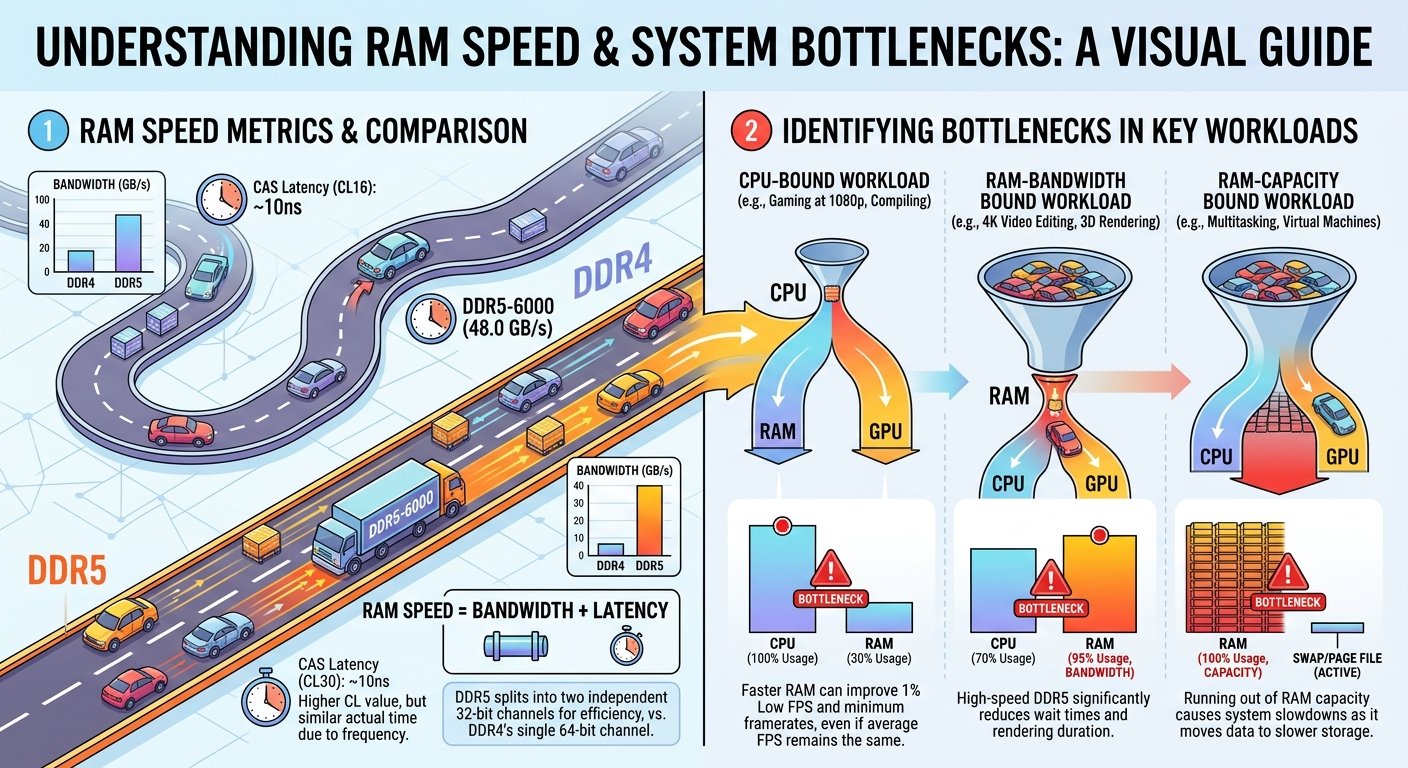
RAM speed affects CPU bottleneck because faster memory delivers data to the processor more quickly reducing the latency between when the CPU needs data and when it receives it. In gaming, this matters most in CPU-sensitive scenarios: at 1080p with a fast GPU, in competitive shooters, and on CPU architectures with strong sensitivity to memory bandwidth (particularly AMD Ryzen). The FPS gain from faster RAM is real but moderate — typically 3–12% in the most sensitive scenarios, and less than 3% in GPU-bound scenarios at 1440p/4K.
As covered in the RAM bottleneck guide, capacity still matters more than speed but once you have adequate capacity, speed becomes the relevant variable.
How RAM Speed Affects the CPU Instruction Loop
The CPU constantly retrieves game data — textures, physics data, game state from main memory during gameplay. When RAM is slow, the processor has to wait longer for that data to arrive before it can complete the instruction and send it to the GPU. This waiting time is measured as memory latency and it shows up as CPU bottleneck: the GPU sits idle while the CPU waits on its slow memory pipeline.
Two RAM characteristics drive this:
- Frequency (MHz): How fast data moves through the memory channel; higher frequency = more data transferred per second
- Latency (CL): How many clock cycles the controller must wait before receiving data; lower CL = less waiting, even at the same frequency
The combination that matters is effective latency — which balances frequency and CL timing into an actual nanosecond wait time. A 3600MHz CL16 kit has nearly identical effective latency to a 3200MHz CL14 kit, which is why frequency alone doesn't tell the whole story.
DDR4 Gaming Sweet Spots: 3200MHz vs 3600MHz
For DDR4 (LGA1700 Intel, AM4 AMD), the two most relevant speeds are 3200MHz and 3600MHz:
| Speed | Effective for Intel | Effective for AMD (Ryzen) | Notes |
|---|---|---|---|
| 2133MHz (default) | Baseline | Noticeably sub-optimal | Default if XMP not enabled |
| 3200MHz CL16 | Good | Good | Minimum for modern gaming |
| 3600MHz CL16 | Marginal improvement | ✅ Optimal — sweet spot | Infinity Fabric syncs at 1800MHz |
| 3600MHz CL18 | Marginal improvement | Good — slightly below CL16 | Lower cost option |
| 4000MHz CL16 | Minimal extra gain | Fabric may need async | Diminishing returns begin |
| 4800MHz+ DDR4 | Minimal extra gain | Often requires async IF | Rarely worth cost for gaming |
The AMD 3600MHz sweet spot explained: AMD Ryzen's Infinity Fabric (the internal interconnect between CPU cores and memory controller) synchronises ideally at half the DRAM frequency. At 3600MHz DRAM, the Fabric runs at 1800MHz — its optimal point. Below 3600MHz, you're leaving Infinity Fabric performance on the table. Above 3600MHz, the Fabric often needs to run asynchronously, which can negate bandwidth gains with added latency.
- How RAM Speed Affects the CPU Instruction Loop
- DDR4 Gaming Sweet Spots: 3200MHz vs 3600MHz
- DDR5 Gaming Sweet Spots: 5600MHz vs 6000MHz vs 7200MHz+
- Actual FPS Impact by Scenario
- Is Higher RAM Speed Worth the Cost?
- XMP/EXPO: The Free Speed Upgrade
- Dual Channel vs Single Channel: More Important Than Speed
- Checking Whether RAM Speed Is Your Bottleneck
- Key Takeaways
DDR5 Gaming Sweet Spots: 5600MHz vs 6000MHz vs 7200MHz+
For DDR5 (AM5 AMD, LGA1700/LGA1851 Intel):
| Speed | Intel Performance | AMD AM5 Performance | Notes |
|---|---|---|---|
| 4800MHz (JEDEC default) | Sub-optimal | Noticeably sub-optimal | Ensure XMP/EXPO is enabled |
| 5600MHz | Good | Good | Minimum with XMP for DDR5 |
| 6000MHz CL30 | Strong | ✅ Optimal for Ryzen 7000 | Best price-to-performance |
| 6000MHz CL36 | Good | Good, below CL30 | Slightly lower cost |
| 6400MHz | Marginal gain | Marginal gain | Diminishing returns |
| 7200MHz+ | Minimal gaming gain | Minimal gaming gain | Enthusiast territory |
The AMD 6000MHz sweet spot explained: AMD's Zen 4 architecture on AM5 has a similar Infinity Fabric relationship to DDR5 as Ryzen had to DDR4. 6000MHz DDR5 keeps the Fabric synchronised at 2000MHz — the optimal point for Ryzen 7000 series. At 6000MHz CL30, AMD Ryzen 7000 typically delivers the best gaming performance per dollar of any DDR5 configuration.
Actual FPS Impact by Scenario
The FPS gain from faster RAM is scenario-dependent:
| Scenario | FPS Impact of RAM Speed Upgrade |
|---|---|
| 1080p competitive shooter (CS2, Valorant) | High: 8–15% improvement possible |
| 1080p open-world AAA | Moderate: 5–10% improvement |
| 1440p AAA (GPU-bound) | Low: 2–5% improvement |
| 4K gaming | Minimal: under 2% |
| Ryzen CPU (any) | Higher sensitivity than Intel equivalents |
| AMD 3D V-Cache CPUs | Lower sensitivity — cache compensates for slower RAM |
The Ryzen 7 7800X3D's massive L3 cache is specifically designed to reduce the CPU's dependence on main memory speed — meaning the 7800X3D shows less FPS gain from faster RAM than a standard Ryzen 7 7700X, because the cache absorbs many of the memory latency cycles that faster RAM would otherwise reduce.
Is Higher RAM Speed Worth the Cost?
| Upgrade | Cost Premium | FPS Gain (typical) | Worth It? |
|---|---|---|---|
| DDR4: 3200MHz → 3600MHz | ~$5–$15 | 2–8% depending on game/CPU | ✅ Yes — small premium, real gain |
| DDR4: 3600MHz → 4000MHz | ~$10–$25 | Under 2% in most titles | ⚠️ Marginal |
| DDR5: 4800MHz → 6000MHz | ~$15–$30 | 5–12% in sensitive scenarios | ✅ Yes — especially on Ryzen 7000 |
| DDR5: 6000MHz → 7200MHz | ~$30–$60 | Under 3% in most gaming scenarios | ❌ Not worth it for gaming |
XMP/EXPO: The Free Speed Upgrade
Before considering purchasing faster RAM, confirm your existing RAM is running at its rated speed. Most motherboards default to JEDEC standard speeds (DDR4: 2133–2400MHz; DDR5: 4800MHz) — dramatically below what the kit is rated for.
How to check: CPU-Z → Memory tab → DRAM Frequency × 2 = actual running speed.
If running below rated speed:
- Enter BIOS (usually Delete or F2 at startup)
- Find XMP (Intel) or EXPO (AMD) or DOCP (ASUS AMD boards)
- Enable and select your kit's rated profile
- Save and exit
This free change can deliver 5–10% FPS improvement on AMD platforms and 3–7% on Intel — equivalent to or better than the gain from buying faster RAM. Always enable XMP/EXPO before any RAM purchase decision.
Dual Channel vs Single Channel: More Important Than Speed
RAM channel configuration has more impact than speed differences. Running one 16GB stick (single channel) vs two 8GB sticks (dual channel, same total 16GB) can reduce gaming FPS by 10–20% in memory-bandwidth-sensitive scenarios.
Priority order for RAM optimisation:
- Get to 16GB capacity minimum
- Ensure dual-channel configuration (2 sticks, not 1)
- Enable XMP/EXPO in BIOS
- Consider speed upgrade only after the above three are addressed
Checking Whether RAM Speed Is Your Bottleneck
If you suspect RAM speed is contributing to a CPU bottleneck, check your pairing in the bottleneck calculator — then enable XMP/EXPO if not already active and compare real-world FPS before and after. A meaningful FPS improvement confirms RAM speed was a contributing factor.
Key Takeaways
- Faster RAM reduces CPU bottleneck by improving memory bandwidth and latency the effect is most significant at 1080p in CPU-sensitive games on AMD Ryzen platforms.
- DDR4 sweet spot: 3600MHz CL16 for AMD (Infinity Fabric sync), 3200MHz CL16 for Intel these tiers provide the best price-to-performance ratio.
- DDR5 sweet spot: 6000MHz CL30 for AMD Ryzen 7000 on AM5 (Infinity Fabric optimal); 5600–6000MHz for Intel LGA1700/1851.
- Enable XMP/EXPO in BIOS before any RAM purchase running below rated speed is a common, free-to-fix performance loss of 5–12%.
- Dual-channel configuration (2 sticks) matters more than RAM speed prioritise it over buying faster single-stick RAM.
- The Ryzen 7 7800X3D is less sensitive to RAM speed than standard Ryzen chips because its L3 cache absorbs many memory latency cycles.