What Is a PC Bottleneck? Complete Beginner's Guide (2026)
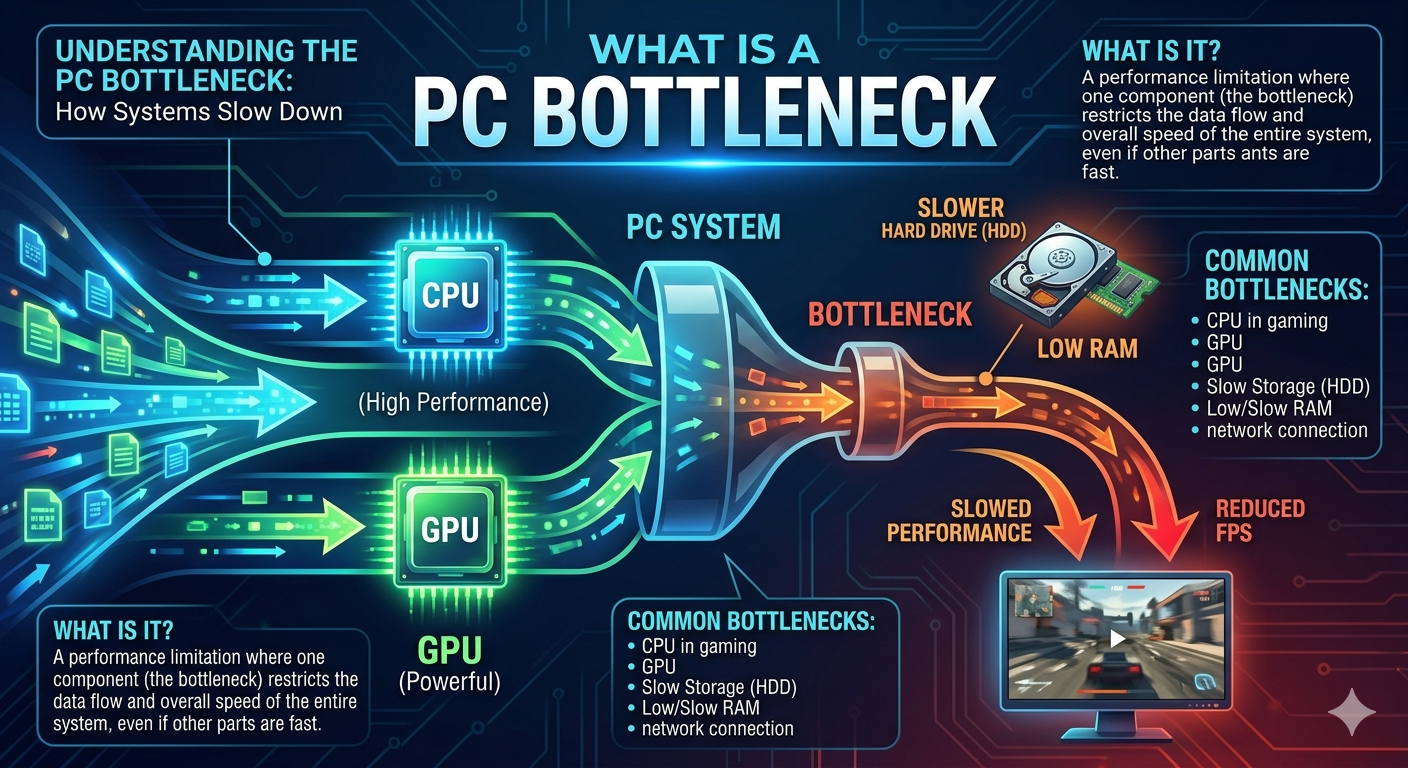
A PC bottleneck is what happens when one component in your computer usually the CPU or GPU can't keep up with another aid for. Bottlenecks are normal in almost every PC; what matters is the size of the gap usually measured as a percentage.
What Bottleneck Actually Means in a PC
The term comes from a simple image: a bottle. Liquid can move quickly through the wide body but it slows down the moment it reaches the narrow neck. Your PC works the same way. Data has to pass through your CPU GPU RAM and storage in sequence to render a frame or finish a task. If any one of those parts is significantly weaker than the others it becomes the "neck" that everything else has to squeeze through.
In practice sits idle waiting for instructions because your CPU can't process them fast enough (a CPU bottleneck)
· Your CPU sits idle waiting for your GPU to finish rendering each frame (a GPU bottleneck)
Both are forms of imbalance. Neither one is inherently "broken" they're just a mismatch in how fast each part can work relative to the other.
Why Bottlenecks Matter for Performance
A bottleneck doesn't just lower a number on a benchmark chart it changes how your PC actually feels to use:
· Lower frame rates than your GPU should theoretically be capable of producing
- What Bottleneck Actually Means in a PC
- Why Bottlenecks Matter for Performance
- The Main Types of PC Bottlenecks
- 1. CPU Bottleneck
- 2. GPU Bottleneck
- 3. RAM Bottleneck
- 4. Storage Bottleneck
- 5. PSU / Power Bottleneck
- How to Tell If You Have a Bottleneck
- What Bottleneck Percentage Is Normal?
- Common Causes of a Bottleneck
- How to Fix or Reduce a Bottleneck
· Stuttering or frame time spikes even when average FPS looks fine
· Wasted money on a powerful component that can't show its full potential
· Slower render and export times in creative or professional software
This is exactly why a bottleneck calculator exists: instead of guessing from forum threads you can enter your exact CPU and GPU and get a percentage that tells you how much performance is being left on the table.
The Main Types of PC Bottlenecks
1. CPU Bottleneck
Your processor can't feed the GPU with instructions fast enough. Common in CPU heavy games (open world titles strategy games simulations) and in older or budget processors paired with a high end graphics card.
2. GPU Bottleneck
Your graphics card is the limiting factor it's working at or near 100% while your CPU has headroom to spare. This is usually the preferred outcome in gaming since it means your most expensive component is being fully used.
3. RAM Bottleneck
Insufficient capacity or slow memory speed can throttle both your CPU and GPU especially in modern AAA titles and multitasking heavy workflows. Running 8GB in 2026 is a common avoidable RAM bottleneck.
4. Storage Bottleneck
A slow HDD or SATA SSD can cause long load times texture pop in and stutter in games that stream large open world assets. NVMe SSDs largely eliminate this issue.
5. PSU / Power Bottleneck
Less common but an undersized power supply can force a GPU to throttle itself to stay within safe power limits indirectly creating a performance ceiling.
How to Tell If You Have a Bottleneck
You don't need expensive software to spot the symptoms. While gaming or rendering watch your CPU and GPU usage:
· GPU usage stays below 90% while CPU usage sits near 100% → likely a CPU bottleneck
· GPU usage sits near 100% while CPU usage has room to spare → likely a GPU bottleneck (and usually fine)
· Frame rates are lower than review benchmarks for your exact GPU → worth investigating either component
The fastest way to get a precise answer without monitoring software is to plug your exact CPU and GPU models into a bottleneck calculator which compares benchmark based performance scores and returns a bottleneck percentage instantly.
What Bottleneck Percentage Is Normal?
|
Bottleneck Percentage |
What It Means |
|
0–9% |
Excellent balance, effectively unnoticeable |
|
10–19% |
Mild imbalance, rarely noticeable in casual use |
|
20–30% |
Noticeable bottleneck, worth addressing |
|
30%+ |
Severe bottleneck, upgrade strongly recommended |
No real world PC build has a perfect 0% balance and that's fine. The goal isn't perfection it's staying in the "acceptable" range for your use case.
Common Causes of a Bottleneck
· Pairing a budget or several generations old CPU with a current flagship GPU
· Running 8GB of RAM with a modern AAA game
· Gaming at 1080p with a high end GPU built for 4K (the CPU becomes the limiting factor at lower resolutions)
· Using a slow HDD instead of an SSD for game installs
· Background processes consuming CPU cycles during gameplay
How to Fix or Reduce a Bottleneck
1. Identify the weaker component using a bottleneck calculator or in game performance overlay.
2. Upgrade the limiting part first there's no benefit upgrading the component that's already ahead.
3. Raise your resolution or settings if you're CPU bottlenecked at 1080p; this shifts more load to the GPU.
4. Add or upgrade RAM if you're running less than 16GB.
5. Update GPU drivers and BIOS/chipset drivers which can quietly resolve inefficiencies.
6. Close background apps that compete for CPU cycles during gaming sessions.
Before spending money it's worth running your current setup and any prospective upgrade through the Compare Systems tool to see exactly how much improvement a new part would actually deliver.


