NVMe SSD vs SATA SSD vs HDD: Does Storage Cause Bottlenecks?
Yes, slow storage can bottleneck your PC but in a different way than a CPU or GPU bottleneck. Storage doesn't affect your sustained FPS or limit your GPU's rendering speed. Instead, it controls how quickly game assets load into memory, which affects load times, texture pop-in, stutter during open-world streaming, and how fast your system can launch applications. The more demanding your storage workload, the more visible the difference between HDD, SATA SSD, and NVMe SSD becomes.
How Storage Affects Performance (and How It Doesn't)
To understand storage bottlenecks, it helps to separate what storage actually controls from what people assume it does:
What storage affects directly:
- Game and application load times
- Texture streaming speed in open-world games (GTA, Cyberpunk, Forza Horizon)
- Level and checkpoint load times
- Stutter caused by real-time asset loading during gameplay
What storage does NOT affect:
- Sustained FPS once a game is running and assets are loaded into RAM
- CPU/GPU bottleneck percentage
- GPU rendering speed
- Frame-time consistency in non-streaming scenarios
If your game is fully loaded into RAM and running, swapping from an HDD to an NVMe SSD won't change your frame rate at all — the game is already reading from RAM at that point, and storage speed is irrelevant to active rendering.
HDD: When Storage Becomes a Genuine Bottleneck
A traditional hard disk drive (HDD) becomes a genuine bottleneck in two specific scenarios:
1. Open-world asset streaming: Games like Cyberpunk 2077, Microsoft Flight Simulator, and open-world RPGs continuously stream new assets from storage as you move through the world. An HDD's sequential read speed (~100–200 MB/s) may not be fast enough to keep pace with this demand, causing visible texture pop-in, object loading delays, and stutter that no CPU or GPU upgrade can fix.
- How Storage Affects Performance (and How It Doesn't)
- HDD: When Storage Becomes a Genuine Bottleneck
- SATA SSD: The Floor That Eliminates Most Storage Bottlenecks
- NVMe SSD: When the Extra Speed Actually Matters
- Storage Speed Comparison for Gaming
- Should Storage Be Listed as a Factor in a Bottleneck Calculator?
- Frequently Asked Questions
- Key Takeaways
2. RAM overflow: If a game exhausts available RAM and begins using storage as a page file (virtual memory), HDD speeds make this swap catastrophically slow producing severe stutter and multi-second freezes. A SATA SSD or NVMe SSD makes this situation far more manageable, though the correct fix is adding more RAM.
SATA SSD: The Floor That Eliminates Most Storage Bottlenecks
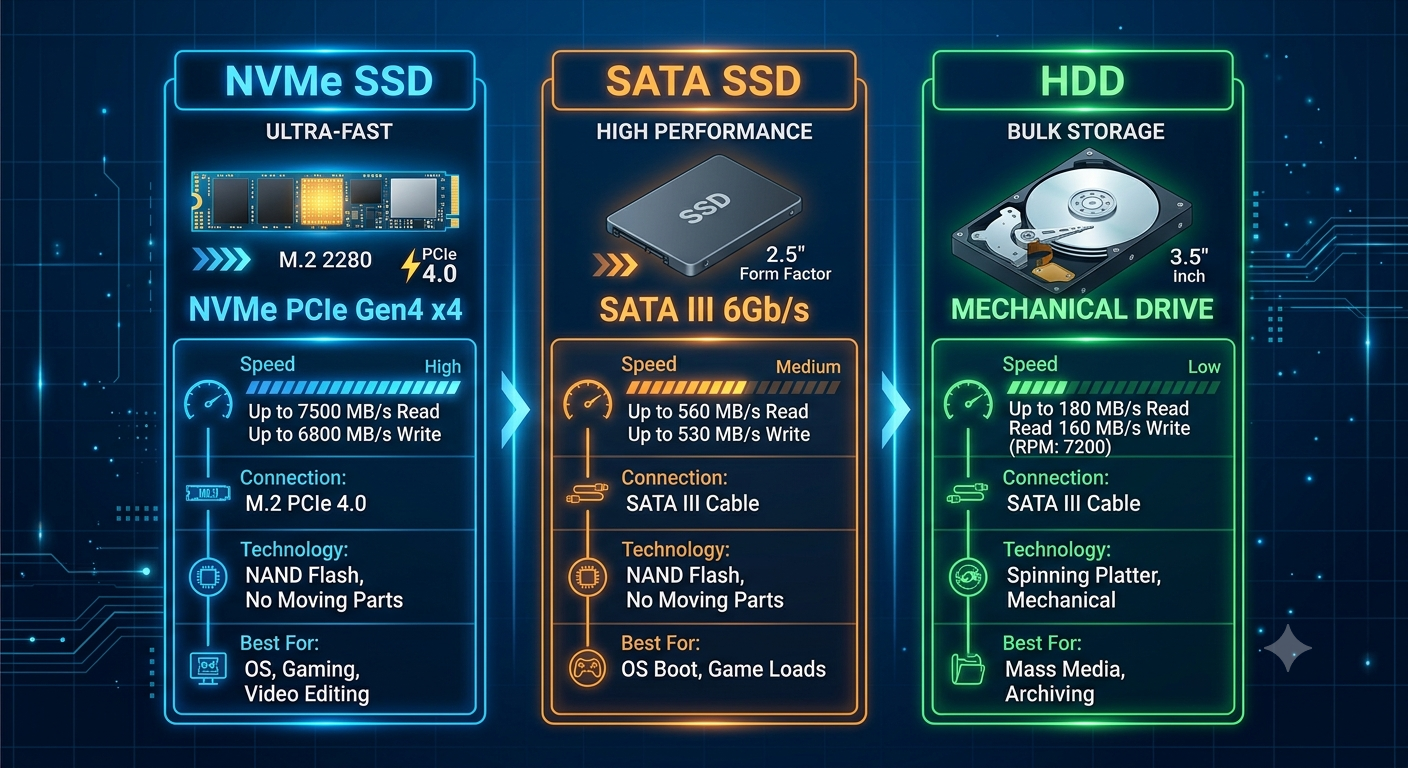
A SATA SSD (~550 MB/s sequential read) eliminates virtually all HDD-related storage bottlenecks for gaming:
- Load times drop from minutes (HDD) to seconds (SATA SSD)
- Texture pop-in largely disappears in most titles
- Page file swaps are fast enough to be tolerable while you add RAM
- Game installation and file transfer times improve dramatically
For the majority of gaming workloads in 2026, a SATA SSD is sufficient the bottleneck difference between a SATA SSD and an NVMe SSD is rarely noticeable in standard gaming scenarios.
NVMe SSD: When the Extra Speed Actually Matters
A modern NVMe SSD (~3,500–7,000 MB/s sequential read, depending on PCIe generation) is meaningfully faster than a SATA SSD, but the gaming scenarios where this difference is visible are more limited:
- DirectStorage-enabled games (a Microsoft API that allows GPUs to decompress assets directly from NVMe storage) can utilize NVMe speeds in ways SATA SSDs cannot
- Extremely large open-world asset streaming in highly optimized titles
- Professional workflows video editing, 3D rendering, and large file transfers are where NVMe's speed advantage is most consistently noticeable
For everyday gaming in 2026, the practical improvement from upgrading a SATA SSD to an NVMe SSD is modest load times improve by seconds rather than minutes, and in-game streaming stutter is already eliminated by the SATA SSD.
Storage Speed Comparison for Gaming
| Storage Type | Sequential Read Speed | Load Time Impact | In-Game Streaming | FPS Impact |
|---|---|---|---|---|
| HDD | ~100–200 MB/s | Very slow | Visible stutter & pop-in | None (if assets loaded in RAM) |
| SATA SSD | ~500–550 MB/s | Fast | Smooth in most titles | None |
| NVMe SSD (PCIe 4.0) | ~5,000–7,000 MB/s | Very fast | Smooth in all titles | None unless DirectStorage used |
Should Storage Be Listed as a Factor in a Bottleneck Calculator?
Yes and it is on the bottleneck calculator. Storage type (HDD, SSD, NVMe) is included because in workloads where storage throughput is a real limiting factor, it can add a secondary bottleneck on top of the CPU/GPU relationship. Selecting "HDD" in the calculator reflects that this additional constraint exists, while NVMe removes it from the equation entirely.
Selecting NVMe SSD is also one of the recommendations in our future-proof PC build guide it ensures storage never becomes a variable in your system's performance picture going forward.
Frequently Asked Questions
Does upgrading from HDD to SSD improve FPS? Not directly storage doesn't affect active rendering FPS. It improves load times, reduces texture pop-in, and eliminates stutter caused by slow asset streaming, which can make the experience feel much smoother.
Is there a performance difference between SATA SSD and NVMe SSD in gaming? For most current games, the difference is minimal mainly shorter load times. DirectStorage-enabled titles can make better use of NVMe speeds, and this gap may grow as more games adopt the API.
Can an HDD cause stuttering even when the game is running? Yes in open-world games that continuously stream new assets from storage, an HDD can cause real-time stutter that no CPU or GPU upgrade will fix. This is a genuine storage bottleneck.
Does the bottleneck calculator account for storage type? Yes. Select your storage type accurately in the bottleneck calculator an HDD adds a secondary bottleneck flag that reflects its real-world impact on streaming-heavy workloads.
Is NVMe SSD worth buying for gaming in 2026? Yes, as the default choice for a primary drive the price difference over SATA SSD is minimal, it's faster across the board, and DirectStorage support in future games makes it the more forward-looking choice.
Key Takeaways
- Storage bottlenecks are real but different from CPU/GPU bottlenecks they affect load times and asset streaming, not active rendering FPS.
- An HDD can cause genuine, unfixable stutter in open-world games that continuously stream assets; this is a true storage bottleneck.
- A SATA SSD eliminates most gaming-relevant storage bottlenecks. The step from SATA SSD to NVMe SSD is minimal for most current gaming titles.
- Upgrading from HDD to SSD will not directly improve your frame rate, but will dramatically improve load times and eliminate streaming-related stutter.
- Select your storage type accurately in the bottleneck calculator an HDD is flagged as a secondary bottleneck factor because of its real impact on asset-streaming workloads.