Modular vs Non-Modular PSU: Does It Affect Performance?
Modular, semi-modular, and non-modular PSUs deliver absolutely identical electrical performance to your components the modularity type affects only cable management, case airflow, and build experience, not the power delivered to your CPU or GPU. For most mid-range and above builds, a semi-modular PSU is the best value choice. A fully modular PSU is worth the premium for high-end or aesthetically focused builds. A non-modular PSU is the right call only when budget is the primary constraint.
Use the PSU calculator to determine the correct wattage first then choose your modularity type based on your case, budget, and build goals.
What the Three Types Mean
Non-Modular PSU
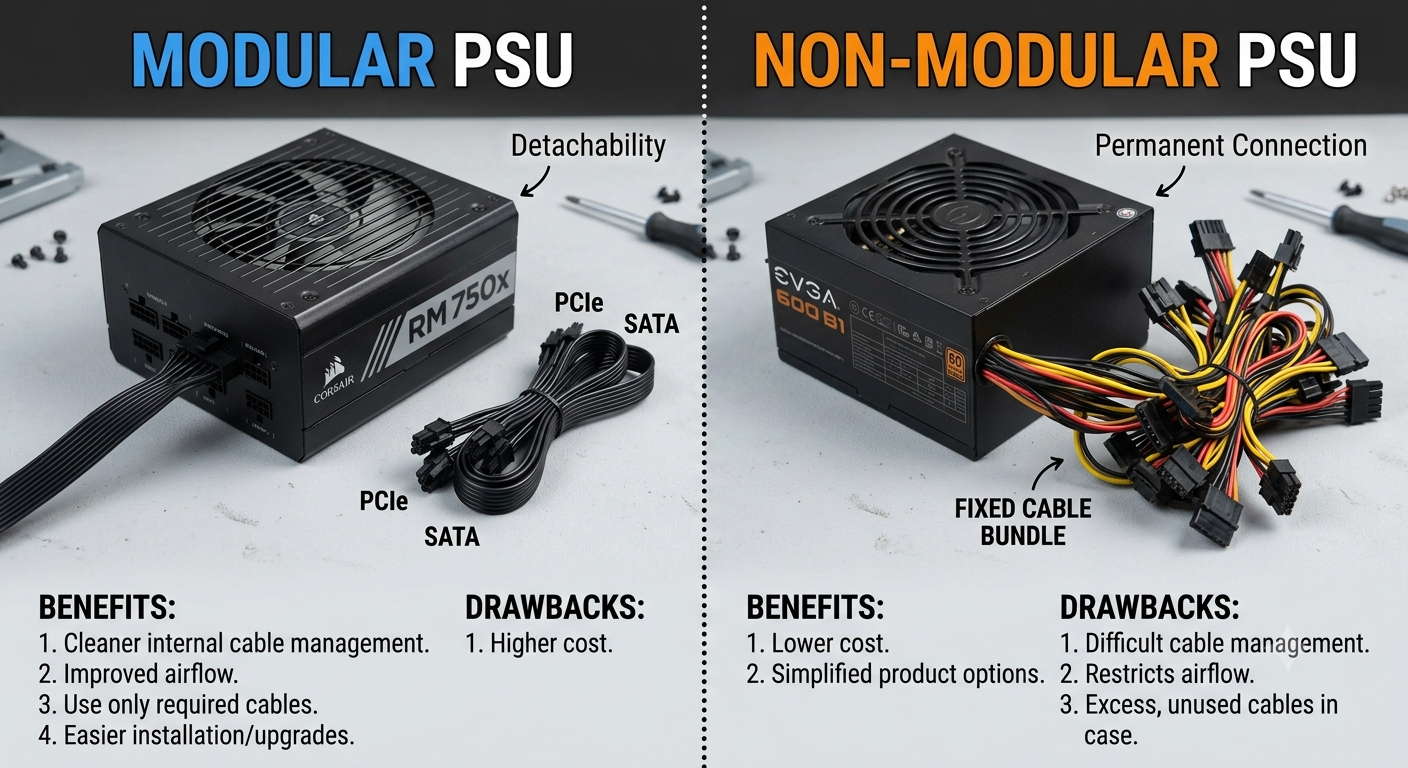
All cables are permanently attached to the PSU unit. Every cable ATX 24-pin, CPU 8-pin, GPU PCIe connectors, SATA power, and Molex s always present whether or not you need it. Unused cables must be routed somewhere inside the case, typically tucked behind the motherboard tray.
Pros: Cheapest option at any given wattage and efficiency tier; no risk of loose cable connections at the PSU end Cons: Forced to manage every cable regardless of whether it's used; harder to achieve clean cable routing
Semi-Modular PSU
The main ATX power cable (24-pin) and CPU power cable (4+4 or 8-pin) are permanently attached these are used in every build. All remaining cables (GPU PCIe, SATA, Molex, additional CPU cables) are detachable.
Pros: Best of both worlds permanently attached cables for the two you always need; detachable cables eliminate clutter for everything else; mid-range price premium over non-modular Cons: Still have the 24-pin and CPU cables permanently attached; can't achieve a fully minimalist look in show builds
Fully Modular PSU
Every cable including the ATX 24-pin and CPU power is detachable. You only connect the cables your specific build actually requires.
Pros: Maximum cable management flexibility; cleanest possible build with only needed cables; ideal for small form factor (SFF) builds where every millimetre of internal space matters Cons: Most expensive option; risk of loose connections at the PSU end if cables aren't fully seated; requires careful cable management discipline
Performance Impact: Zero
It's worth being direct: choosing a non-modular PSU over a fully modular one of the same wattage and efficiency rating has no measurable effect on:
- CPU or GPU performance
- Frame rates or benchmark scores
- System stability under load
- Power delivery to any component
- Operating temperatures of CPU or GPU
Modularity is purely a build convenience and aesthetics feature. The electrical output is determined entirely by the wattage rating, efficiency tier, and quality of the PSU's internals not by whether the cables are permanently attached.
Does Cable Management Affect Airflow?
Indirectly, yes though only in poorly managed builds. In a well-organised build, unused cables are routed behind the motherboard tray regardless of PSU type, and airflow is not meaningfully affected. In a poorly managed non-modular build where unused cables are loosely bundled in the main chamber, airflow can be slightly restricted.
This is a build practice issue, not a PSU type issue. With attention to cable routing, a non-modular PSU can be just as airflow-friendly as a modular one.
Which Type Is Right for Your Build?
| Scenario | Best Choice | Reason |
|---|---|---|
| Tightest budget, standard ATX case | Non-Modular | Cheapest; extra cables manageable in a large case |
| Mid-range build, standard ATX case | Semi-Modular | ✅ Best value; detachable secondary cables |
| High-end build with cable management priority | Fully Modular | ✅ Worth the premium for cleaner build |
| Small form factor (SFF/ITX) build | Fully Modular | Space efficiency critical; every cable counts |
| Show build / window-panel display | Fully Modular | Aesthetics justify the cost |
| Content creator with rebuild frequency | Fully Modular | Easier to replace/reroute individual cables |
Price Premium Comparison
The typical price difference between types at the same wattage and efficiency tier:
- Non-Modular to Semi-Modular: ~$10–$25 premium depending on brand and wattage
- Semi-Modular to Fully Modular: ~$15–$35 additional premium
- Non-Modular to Fully Modular: ~$25–$60 total premium
At 80+ Gold 750W tier as an example: a non-modular unit might cost $70–$80; semi-modular $85–$100; fully modular $100–$130 from the same manufacturer family. These are approximate ranges that vary significantly by brand and sales.
The Case Size Factor
Case size significantly affects how important modularity is in practice:
- Full ATX tower: Large cases have extensive cable routing space behind the motherboard tray; even a non-modular PSU's unused cables can be managed cleanly. Modularity is a convenience, not a necessity.
- Mid ATX tower: Semi-modular is the sweet spot enough space to manage cables but tight enough that the detachable secondary cables make a noticeable difference in tidiness.
- Mini-ITX / SFF: Fully modular is close to essential. In tiny cases every cable that isn't needed creates a real obstruction. Many SFF builders also use custom-length or sleeved cables to minimise cable run length.
A Note on Cable Quality
Modularity type doesn't indicate cable quality a non-modular PSU can have higher quality cables than a fully modular one from a different brand. Within the same manufacturer's lineup, cable quality is typically consistent across modularity types at the same tier.
What does matter for cable quality: cable gauge (thicker is better for high-current runs like GPU PCIe and CPU power), insulation quality, and for high-end builds whether braided/sleeved cables are included or available separately.
How to Pair PSU Type Selection With Wattage
The correct order of decisions when buying a PSU:
- Wattage first: Use the PSU calculator to determine the right wattage for your specific CPU and GPU
- Efficiency tier second: Use the 80+ guide to choose Bronze/Gold/Platinum based on your build's power level
- Modularity third: Choose modular type based on your case size, budget, and cable management priorities
- Brand last: Select a reputable manufacturer within your chosen wattage, efficiency, and modularity combination
Key Takeaways
- Modular, semi-modular, and non-modular PSUs deliver identical performance — modularity affects cable management only, not power output or component performance.
- Semi-modular is the best value for most standard ATX builds: permanently attached cables for what you always need, detachable for everything else.
- Fully modular is worth the premium for high-end builds, SFF cases, or aesthetics-focused systems where cable minimalism is important.
- Non-modular is the right choice only when budget is the primary constraint — the performance is identical, the extra cables just require more careful management.
- Loose modular cable connections at the PSU end are the one real reliability consideration unique to modular PSUs — always fully seat all modular cables.
- Determine wattage via the PSU calculator and efficiency tier first — modularity is the final PSU selection decision.