i7-13700K vs i7-14700K: Bottleneck and Gaming Comparison (2026)
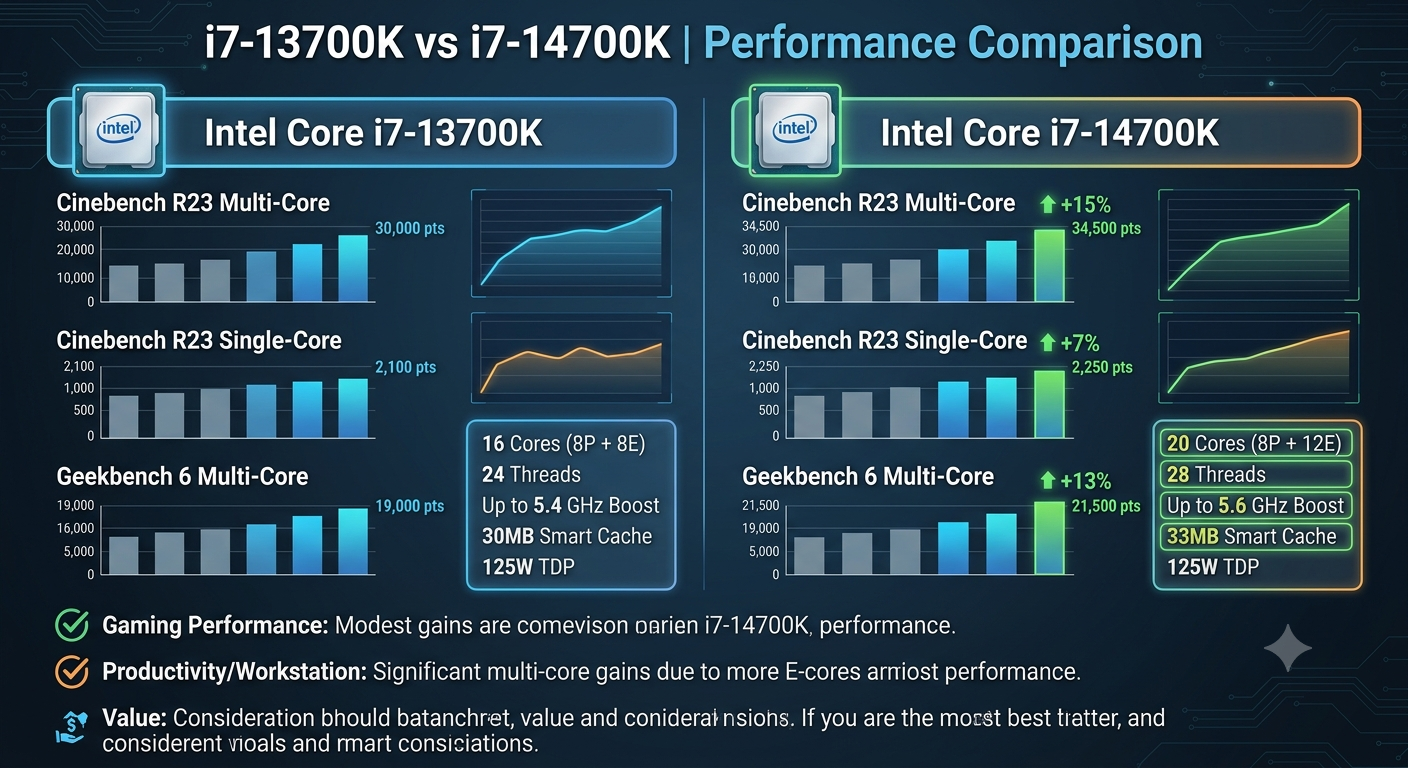
The Intel Core i7-14700K delivers roughly 3–8% better gaming performance than the i7-13700K across most tested titles in 2026, primarily due to its additional 4 Efficient cores (20 total vs 16 total) and slightly higher boost clocks. For bottleneck purposes, both CPUs pair with the same GPU tier without a meaningful difference in bottleneck percentage at 1440p or 4K the gap is only measurable at 1080p in the most CPU-intensive game genres. Unless you're buying new, upgrading from an i7-13700K to an i7-14700K is rarely cost-justified.
Compare your exact CPU and GPU combination for either chip in the Compare Systems tool to see the bottleneck difference side by side.
Core Specifications Compared
| Specification | Core i7-13700K | Core i7-14700K |
|---|---|---|
| P-Cores | 8 | 8 |
| E-Cores | 8 | 12 |
| Total Cores / Threads | 16C / 24T | 20C / 28T |
| P-Core Base / Boost | 3.4GHz / 5.4GHz | 3.4GHz / 5.6GHz |
| E-Core Base / Boost | 2.5GHz / 4.2GHz | 2.5GHz / 4.3GHz |
| L3 Cache | 30MB | 33MB |
| TDP / PL2 | 125W / 253W | 125W / 253W |
| Memory Support | DDR4/DDR5 | DDR4/DDR5 |
| Socket | LGA1700 | LGA1700 |
The i7-14700K's headline upgrade over the i7-13700K: 4 additional Efficient cores and a slight P-core boost clock increase of 200MHz. Both chips use the same LGA1700 socket, the same power delivery requirements, and the same DDR4/DDR5 memory support.
Gaming Performance Gap: How Big Is It?
The i7-14700K's gaming advantage over the i7-13700K is real but modest typically 3–8% in average FPS and potentially more in minimum FPS in scenarios where extra E-cores absorb background workload more effectively.
The gap is most visible in:
- CPU-heavy game genres where the extra E-cores help offload non-game background tasks
- 1080p gaming where CPU performance is the tighter constraint
- Streaming while gaming where E-cores absorb encoder load, freeing P-cores for the game
The gap is least visible in:
- GPU-bound scenarios at 1440p or 4K the GPU is the bottleneck and the CPU difference is effectively invisible
- GPU-heavy single-player games rarely exercise even the i7-13700K's full capacity
Bottleneck Comparison With the Same GPU
For bottleneck purposes, both CPUs produce nearly identical results when paired with the same GPU at 1440p and 4K. The difference at 1080p is measurable but typically falls within 3–6 percentage points:
| GPU | i7-13700K (1080p) | i7-14700K (1080p) | i7-13700K (1440p) | i7-14700K (1440p) |
|---|---|---|---|---|
| RTX 4090 | ~14–22% | ~11–18% | ~6–12% | ~4–9% |
| RTX 4080 Super | ~10–16% | ~8–13% | ~4–8% | ~3–6% |
| RTX 4070 Ti Super | ~7–13% | ~5–10% | ~3–6% | ~2–5% |
| RTX 4070 Super | ~5–10% | ~3–8% | Negligible | Negligible |
| RTX 4070 | Negligible | Negligible | Negligible | Negligible |
At 1440p with any GPU below the RTX 4080 tier, the bottleneck difference between the two CPUs is effectively indistinguishable. Both are strong enough to feed mid-to-high-range GPUs at that resolution.
Enter your specific CPU and GPU combination into the bottleneck calculator to confirm the exact percentage for either chip at your resolution.
Is It Worth Upgrading From i7-13700K to i7-14700K?
No, in most cases. The performance gap is too small to justify the cost of a CPU upgrade for existing i7-13700K owners:
- Both chips use LGA1700, so a swap is physically possible without a new motherboard or RAM
- But a 3–8% gaming performance improvement is well below the threshold most users would notice without a side-by-side benchmark comparison
- The cost of the CPU itself when the i7-13700K is already performing well — isn't recovered in noticeable gameplay improvement
The only cases where upgrading makes sense:
- You need the extra E-cores specifically for heavy simultaneous workloads (streaming at very high bitrate + gaming, heavy background compilation + gaming)
- You're getting an unusually good price on an i7-14700K and selling the 13700K covers most of the cost
Which Should You Buy for a New Build in 2026?
If building fresh on LGA1700, the i7-14700K is the better choice over the i7-13700K because:
- The price difference between the two has narrowed significantly in 2026
- The extra E-cores provide a small but real benefit for multitasking and streaming workloads
- It offers the highest generational performance available on the LGA1700 platform before stepping up to i9 or switching to a newer platform
Use the Compare Systems tool to compare both CPUs against your planned GPU and confirm the bottleneck difference justifies any price premium in your specific market.
Platform Considerations in 2026
Both chips are on the LGA1700 platform, which is Intel's mature 12th/13th/14th gen ecosystem. In 2026 this platform is at the end of its active product cycle Intel's newer architectures use different sockets. This means:
- No future CPU upgrade path within LGA1700 beyond the existing 14th gen lineup
- The i7-14700K represents one of the last worthwhile CPUs to buy for this platform
- For a longer upgrade runway, Intel's newer socket platforms or AMD AM5 may be worth considering
Key Takeaways
- The i7-14700K is 3–8% faster than the i7-13700K in gaming at 1080p due to 4 extra E-cores and slightly higher P-core boost clocks.
- At 1440p and 4K, the gaming performance and bottleneck difference between the two is negligible in most scenarios.
- Upgrading from an i7-13700K to an i7-14700K is rarely worth the cost for gaming purposes alone the improvement is too small to be noticeable in real-world play.
- For new builds on LGA1700 in 2026, the i7-14700K is the better choice if the price difference is small.
- Both CPUs pair with the same GPU tier recommendations anything from RTX 4060 Ti to RTX 4080 Super at 1440p produces a clean, well-matched result.
- Confirm the exact bottleneck for either CPU at your resolution using the bottleneck calculator and compare them side by side in the Compare Systems tool.
Key Takeaways