How to Calculate PSU Wattage for a Multi-GPU Setup (2026 Guide)
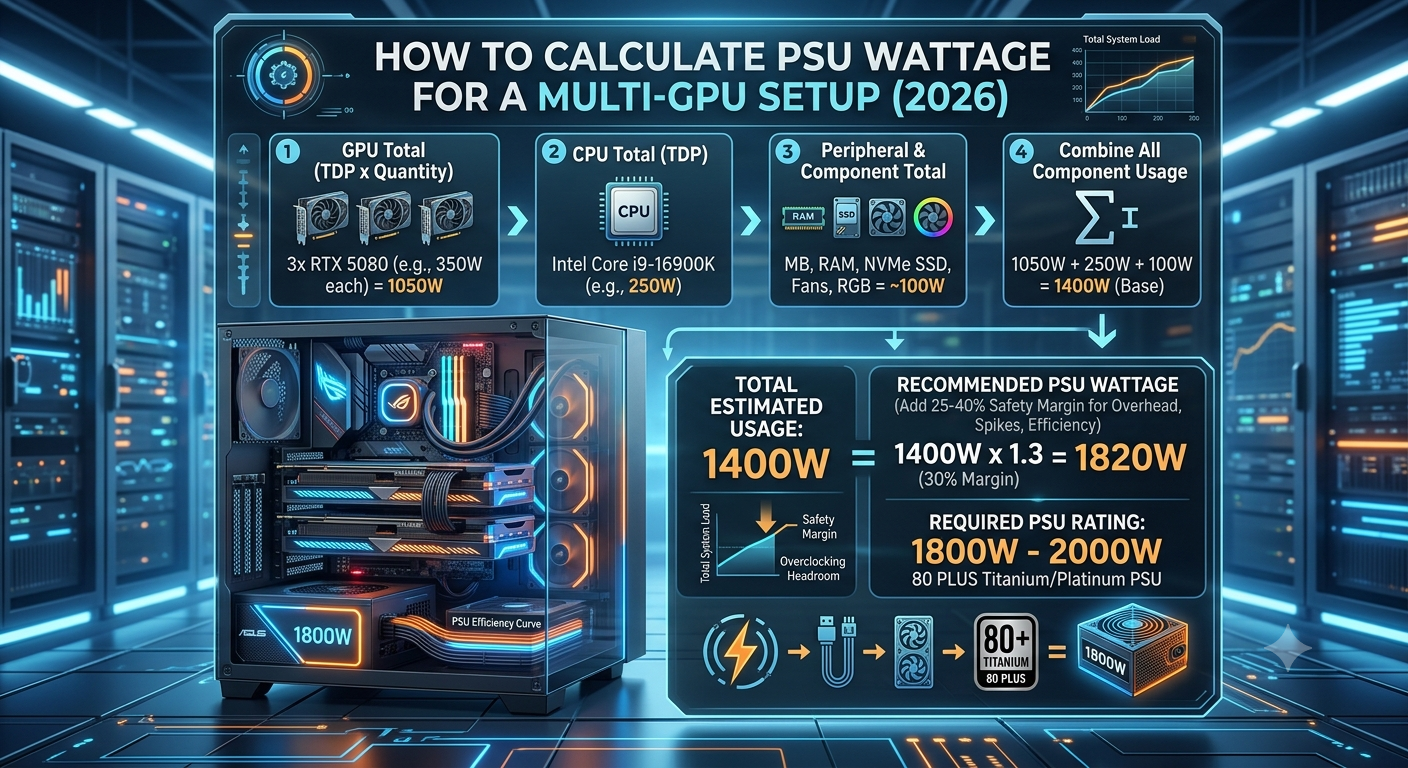
To calculate PSU wattage for a multi-GPU system, add the TDP of each GPU, the CPU's PL2/max power draw, and approximately 75–100W of system overhead, then multiply the total by 1.25 for the efficiency headroom buffer. A dual RTX 4090 system, for example, draws approximately 1000W in GPU TDP alone requiring a 1600W+ PSU, which is beyond the range of most consumer units and enters workstation PSU territory.
For single-GPU systems, use the PSU calculator for a precise result. For multi-GPU systems, use the manual calculation below most online PSU calculators are designed for single-GPU configurations.
Is Multi-GPU Gaming Still Viable in 2026?
Before calculating PSU requirements, it's worth addressing whether a multi-GPU gaming setup is actually worth building in 2026:
The honest answer: for gaming, largely no. Multi-GPU gaming support in mainstream titles has declined significantly since 2018–2020. NVIDIA discontinued SLI support for non-NVLink configurations in 2020, and NVLink itself is now restricted to workstation-class GPUs (RTX 3000/4000 Quadro and A-series, not consumer RTX). AMD discontinued explicit multi-GPU (CrossFire/mGPU) rendering for gaming in 2023.
In practice, multi-GPU in 2026 is primarily relevant for:
- Professional AI and machine learning inference multiple consumer GPUs (RTX 4090 x2, x4) for parallel AI workloads where software explicitly supports multi-GPU
- 3D rendering — some render engines (OctaneRender, LuxCoreRender, Redshift) support multi-GPU rendering with near-linear scaling
- VRAM pooling — applications that can leverage combined VRAM across multiple GPUs for very large model inference
For gaming alone, a single RTX 4090 or RX 7900 XTX will outperform any multi-GPU gaming setup in 2026 simply because game engines no longer support the multi-GPU path efficiently.
How to Calculate Multi-GPU PSU Wattage
Step 1: GPU TDP × Number of GPUs
Multiply each GPU's TDP by the number of units. For dual RTX 4090:
- 450W × 2 = 900W in GPU TDP alone
For four RTX 4090s (AI/rendering workstation):
- Is Multi-GPU Gaming Still Viable in 2026?
- How to Calculate Multi-GPU PSU Wattage
- Step 1: GPU TDP × Number of GPUs
- Step 2: Add CPU Power Draw
- Step 3: Add System Overhead
- Step 4: Apply the 25% Headroom Buffer
- Multi-GPU PSU Requirement Reference Table
- What PSUs Are Available at Very High Wattages?
- Power Delivery Considerations for Multi-GPU
- Monitoring Power Draw in a Multi-GPU System
- Key Takeaways
- 450W × 4 = 1800W in GPU TDP alone
Step 2: Add CPU Power Draw
Add the CPU's PL2 or maximum TDP. For a workstation CPU like Ryzen Threadripper PRO 5965WX:
- 280W CPU TDP + 900W GPU = 1180W
For a consumer CPU like Core i9-14900K:
- 253W + 900W = 1153W
Step 3: Add System Overhead
Add 100–150W for a multi-GPU system (more storage, more fans, PCIe risers or switches potentially):
- 1153W + 125W = 1278W
Step 4: Apply the 25% Headroom Buffer
Multiply by 1.25:
- 1278W × 1.25 = 1597W minimum
For a dual RTX 4090 system, a 1600W PSU is the absolute minimum. In practice, 2000W is the comfortable recommendation for dual RTX 4090 with a high-TDP CPU at any overclock.
Multi-GPU PSU Requirement Reference Table
| GPU Configuration | GPU TDP Total | High-TDP CPU | System Overhead | Minimum PSU | Recommended PSU |
|---|---|---|---|---|---|
| Dual RTX 4070 | 400W | 253W | 100W | 950W | 1200W |
| Dual RTX 4080 | 640W | 253W | 100W | 1240W | 1500W |
| Dual RTX 4090 | 900W | 253W | 125W | 1600W | 2000W |
| Dual RX 7900 XTX | 710W | 230W | 125W | 1330W | 1600W |
| Quad RTX 4090 | 1800W | 280W (HEDT) | 200W | 2850W | Dual-PSU required |
What PSUs Are Available at Very High Wattages?
Consumer PSUs typically top out at 1600W (with a small number of 1800W units from specialty manufacturers). Above that, options are:
- Single server/workstation PSUs: Units rated at 2000W+ exist but are typically less efficient at partial loads and may require different connectors
- Dual PSU setups: Two high-quality 1000–1200W consumer PSUs connected with a dual-PSU add-2-power adapter; allows the use of standard consumer PSUs for very high draw systems
- Platform PSU solutions: Some workstation chassis include redundant PSU bays that can be combined for very high-draw configurations
For AI/rendering setups with dual RTX 4090 cards, a dual-PSU configuration using two quality 1200W units is often the most practical consumer-accessible solution.
Power Delivery Considerations for Multi-GPU
Beyond total wattage, multi-GPU systems need additional attention to how that power is distributed:
- PCIe slot power limits: Each PCIe x16 slot provides up to 75W from the motherboard, supplemented by external GPU power connectors. For high-draw GPUs this is primarily managed by the PCIe power cables, not the slot itself.
- Multiple 16-pin connectors: Each high-end GPU requiring a 12VHPWR connector needs its own cable run from the PSU — not a daisy-chained cable. A 1600W PSU needs to provide multiple independent high-current cable runs.
- 12V rail quality: For multi-GPU systems, single-rail PSU designs (one 12V rail) are often recommended over multi-rail designs, since they don't have OCP (over-current protection) limits per rail that can trigger false trips in high-draw configurations.
Monitoring Power Draw in a Multi-GPU System
For high-draw multi-GPU builds, a hardware power meter plugged between the wall and the PSU input provides real-time total system power consumption data. This is especially useful for validating that the PSU isn't being pushed to its limits during peak AI inference or rendering workloads.
Key Takeaways
- Multi-GPU gaming is largely obsolete in 2026 both NVIDIA and AMD have discontinued consumer multi-GPU gaming support. Multi-GPU remains relevant for AI inference, 3D rendering, and VRAM pooling workloads.
- To calculate multi-GPU PSU wattage: multiply each GPU TDP × GPU count, add CPU PL2 TDP and 100–150W overhead, then multiply by 1.25 for the headroom buffer.
- Dual RTX 4090 systems need a minimum 1600W PSU a 2000W unit is the comfortable recommendation.
- Most online PSU calculators including the PSU calculator are designed for single-GPU systems; use the manual method above for multi-GPU configurations.
- At extreme wattage requirements (dual RTX 4090 + high-TDP CPU), a dual-PSU configuration is often the most practical consumer-accessible solution.
- Single-rail PSU designs are preferable for multi-GPU systems to avoid OCP trips on individual 12V rails under high simultaneous GPU draw.