How Much Power Supply (PSU) Do I Need? Full Wattage Guide (2026)
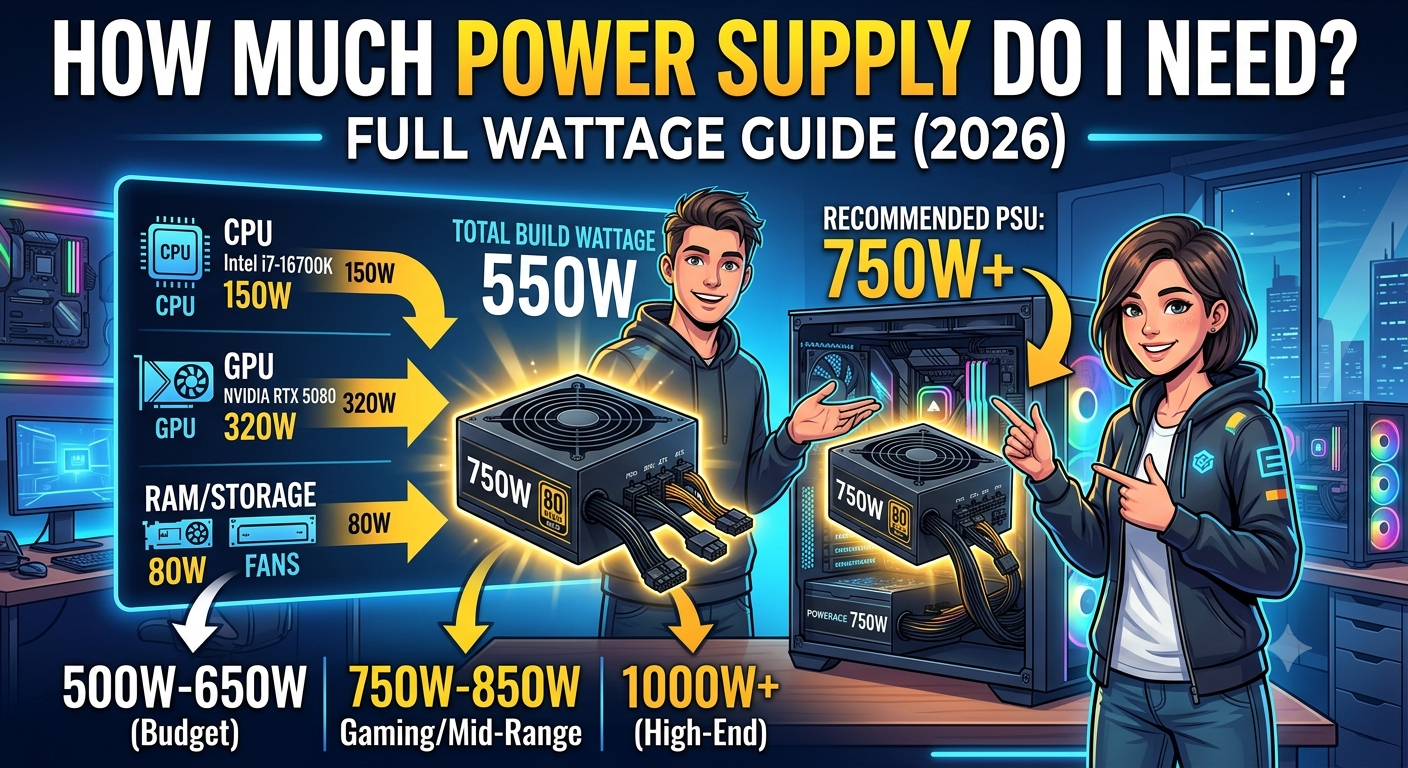
The amount of PSU wattage you need depends on your CPU TDP, GPU TDP, and a 20–30% headroom buffer for efficiency, transient power spikes, and future upgrades. For most mid-range gaming PCs (Core i5/Ryzen 5 + RTX 4070 class), a 650W PSU is sufficient. High-end builds (Core i9/Ryzen 9 + RTX 4090) typically need 850–1000W. The fastest way to get a precise number for your exact components is to use a PSU calculator.
Why PSU Sizing Matters More Than Most People Realise
A PSU that's too small doesn't just run your PC at reduced performance it can cause instability, random shutdowns, and in worst cases hardware damage from sustained voltage irregularities. A PSU that's far too large wastes money and runs at reduced efficiency at light loads (though it doesn't harm your components).
The goal is to choose a PSU that covers your system's peak power draw with a comfortable headroom buffer — typically landing your system between 50–80% of the PSU's rated capacity under full gaming load, which is where most power supplies operate at peak efficiency.
The Two Numbers That Matter Most: CPU TDP and GPU TDP
Your power budget is dominated by two components:
CPU TDP (Thermal Design Power): The CPU's sustained power consumption under load. Note that modern CPUs often have a "PL2" (Power Limit 2) that significantly exceeds the base TDP during short bursts Intel's i9-14900K has a 125W TDP but a 253W PL2, for example. Use the PL2 or maximum power figure for PSU calculations, not just the base TDP.
- Why PSU Sizing Matters More Than Most People Realise
- The Two Numbers That Matter Most: CPU TDP and GPU TDP
- Quick PSU Wattage Guide by System Tier
- How the 20–30% Headroom Buffer Works
- Step-by-Step: Calculating Your PSU Requirement
- Why PSU Efficiency Ratings (80+ Bronze, Gold, Platinum) Matter
- Common PSU Sizing Mistakes
- Key Takeaways
GPU TDP (Total Graphics Power): The GPU's sustained power draw under gaming load. The RTX 4090, for example, has a 450W TDP — the single largest power contributor in a modern gaming PC.
Everything else — RAM, storage, motherboard, fans, USB devices typically adds 50–100W combined for a mainstream gaming build.
Quick PSU Wattage Guide by System Tier
| Build Tier | Example CPU + GPU | Recommended PSU |
|---|---|---|
| Budget gaming (1080p) | Core i3-12100F + RTX 4060 | 550W 80+ Bronze |
| Mid-range gaming (1080p/1440p) | Core i5-13600K + RTX 4070 | 650W 80+ Gold |
| High-end gaming (1440p) | Ryzen 7 7800X3D + RTX 4070 Ti Super | 750W 80+ Gold |
| Enthusiast gaming (1440p/4K) | Core i9-14900K + RTX 4080 Super | 850W 80+ Gold |
| Flagship gaming (4K) | Ryzen 9 7950X3D + RTX 4090 | 1000W 80+ Gold/Platinum |
| Dual GPU / Workstation | High-TDP CPU + RTX 4090 OC | 1200W+ 80+ Platinum |
These are starting recommendations — your exact wattage requirement should be calculated using the PSU calculator with your specific components.
How the 20–30% Headroom Buffer Works
If your system draws 550W under peak gaming load, you should not buy a 550W PSU you should buy a 650W or 750W unit. Here's why the buffer matters:
1. Efficiency losses: No PSU converts 100% of wall power to DC power for your components. An 80+ Gold PSU is around 90% efficient at 50% load, meaning a 550W draw requires ~610W from the wall. Running too close to the PSU's rated capacity pushes it into less efficient operating territory.
2. Transient power spikes: Both CPUs and GPUs can draw significantly more than their rated TDP for very brief periods (milliseconds) during certain workloads. These spikes don't show up in average power monitoring but can trigger a PSU's overcurrent protection if the headroom is insufficient.
3. Component additions: Adding a second SSD, an extra fan, or a USB device all add to your total system power draw. Headroom accommodates growth without requiring a PSU replacement.
4. PSU ageing: Power supplies lose efficiency and capacity slightly over years of use. A buffer ensures adequate headroom even as the unit ages.
Step-by-Step: Calculating Your PSU Requirement
Step 1: Find your CPU's maximum power draw (PL2 or "Maximum Turbo Power" in the spec sheet, not just the base TDP).
Step 2: Find your GPU's TDP from the manufacturer's spec page.
Step 3: Add 75–100W for all other components (motherboard, RAM, storage, fans, USB devices).
Step 4: Add your CPU and GPU figures plus the other-components estimate for your total system draw.
Step 5: Divide the total by 0.8 (applying a 20% headroom buffer) to get the minimum recommended PSU wattage.
Example:
- CPU: Core i7-14700K PL2 = 253W
- GPU: RTX 4070 Ti Super TDP = 285W
- Other components: ~80W
- Total system draw: 618W
- With 20% buffer: 618 / 0.8 = 772W → buy an 850W PSU
For a faster, more precise result, enter your exact components into the PSU calculator it handles all the maths automatically.
Why PSU Efficiency Ratings (80+ Bronze, Gold, Platinum) Matter
The 80 Plus certification indicates how efficiently a PSU converts AC power from the wall into DC power for your components:
| Rating | Efficiency at 50% Load | Efficiency at 100% Load |
|---|---|---|
| 80+ White | 80% | 80% |
| 80+ Bronze | 85% | 82% |
| 80+ Silver | 88% | 85% |
| 80+ Gold | 90% | 87% |
| 80+ Platinum | 92% | 89% |
| 80+ Titanium | 94% | 90% |
For gaming builds, 80+ Gold is the recommended minimum. The premium over Bronze is modest, the efficiency benefit is real (lower electricity bills over time, less heat generated by the PSU itself), and Gold-rated units tend to come from manufacturers with stronger build quality.
80+ Bronze is acceptable for budget builds where upfront cost is critical. 80+ Platinum and Titanium are worth considering for high-wattage flagship builds where the efficiency savings over extended use are more significant.
Common PSU Sizing Mistakes
Undersizing: Buying a 550W PSU for a build that draws 520W under load. No headroom for spikes, ageing, or component additions and running at near-100% capacity reduces efficiency and lifespan.
Extreme oversizing: Buying an 1000W PSU for a 350W system. The efficiency curve means a PSU operates least efficiently at very low loads (under 20% of capacity). A 350W system on a 1000W PSU may actually be slightly less efficient than on a 550W unit.
Ignoring PL2: Using the CPU's base TDP (e.g., 125W for the i9-14900K) instead of its PL2 (253W). This can underestimate system draw by over 100W in CPUs with high power limits.
Buying unknown brands: A cheap, unrated PSU from an unknown manufacturer may not deliver its rated wattage reliably, skip overcurrent protection, or fail ungracefully in a way that damages connected components. Stick to reputable brands with confirmed efficiency ratings.
Key Takeaways
- PSU wattage requirement = peak system draw (CPU PL2 + GPU TDP + ~80W other) ÷ 0.8 for 20% headroom.
- Most mid-range gaming builds (i5/Ryzen 5 + RTX 4070 class) need a 650W PSU; enthusiast builds (i9/Ryzen 9 + RTX 4090) need 850–1000W.
- Always use the CPU's PL2 (maximum power limit) rather than the base TDP the difference can be 100W or more in high-performance CPUs.
- 80+ Gold is the recommended efficiency minimum for gaming builds; it reduces electricity costs and PSU operating temperature.
- Avoid extreme undersizing (no headroom) and extreme oversizing (low-load efficiency loss) the sweet spot is your system drawing 50–80% of the PSU's rated capacity under gaming load.
- Use the PSU calculator for a precise, component-specific recommendation.