CPU Bottleneck vs GPU Bottleneck: Which One Is Worse?
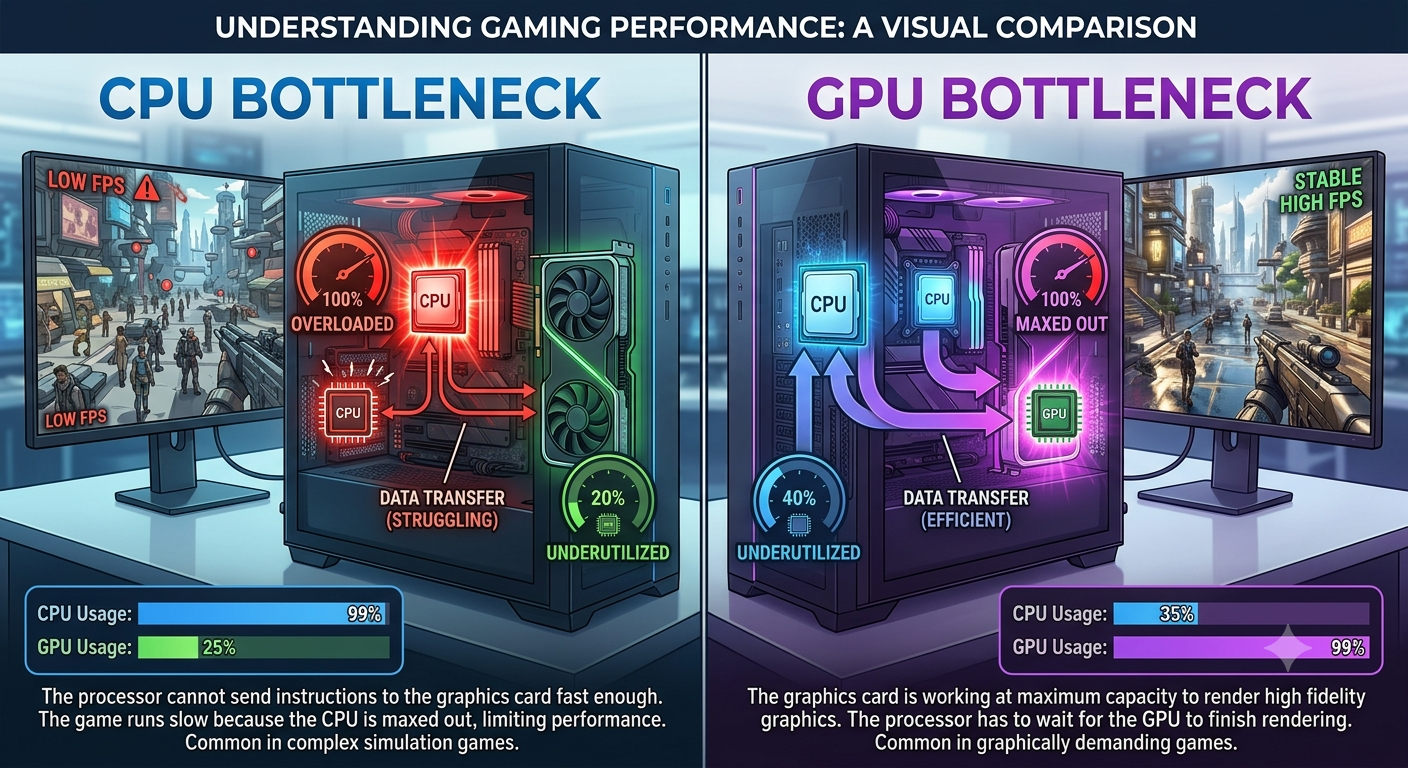
For most gamers, a CPU bottleneck is generally considered the worse of the two, because it means your GPU usually the more expensive component is sitting idle and not delivering the performance you paid for. A GPU bottleneck, by contrast, usually means your GPU is fully utilized, which is the desirable outcome; it only becomes a problem if the resulting frame rate is too low for your needs.
The Core Difference
These two bottleneck types aren't just opposite labels they represent fundamentally different situations:
- CPU bottleneck: GPU usage stays below ~90% while CPU usage sits near 100%. Your processor can't supply instructions fast enough, so your graphics card often the pricier component can't show its full performance.
- GPU bottleneck: GPU usage sits near 100% while CPU usage has headroom to spare. Your graphics card is working as hard as it can, which is generally what you want from it.
As covered in our CPU bottleneck guide and GPU bottleneck guide, these aren't symmetrical situations one represents wasted potential, the other usually represents fully realized potential.
Why a CPU Bottleneck Is Usually Considered Worse
- It wastes your most expensive purchase. GPUs are typically the priciest single component in a gaming build. A CPU bottleneck means that investment isn't being fully used.
- A GPU upgrade won't fix it. If your CPU is already the limiting factor, spending more on an even better GPU delivers little to no additional performance a frustrating dead end for anyone who doesn't realize the CPU is the actual problem.
- It's more common at the resolutions many gamers actually play at. As explained in our resolution and bottleneck guide, CPU bottlenecks are most pronounced at 1080p still one of the most widely used gaming resolutions.
- It directly limits competitive gaming performance, where minimum frame rates and frame-time consistency matter as much as average FPS.
Why a GPU Bottleneck Is Usually Considered Fine
- It means your GPU spending paid off. A fully utilized GPU is exactly what you bought it for.
- A future GPU upgrade will deliver real gains, since your CPU already has headroom to support a faster card.
- It's the natural, expected outcome at higher resolutions (1440p, 4K), where the GPU is supposed to carry most of the workload.
- It only becomes a genuine problem in one specific scenario: when the resulting frame rate is too low for your needs — at which point the fix (upgrade the GPU or lower settings) is direct and obvious.
Side-by-Side Comparison
| CPU Bottleneck | GPU Bottleneck | |
|---|---|---|
| Usage pattern | CPU ~100%, GPU below 90% | GPU ~100%, CPU has headroom |
| Generally a problem? | Often yes, especially if severe | Usually no — it's the expected outcome |
| Wastes which component's investment? | GPU | Neither — GPU is fully used |
| Fixed by upgrading GPU? | No | Yes, if frame rate is too low |
| Fixed by upgrading CPU? | Yes | No benefit |
| Most common at | 1080p, CPU-heavy games | 1440p/4K, GPU-heavy/visually demanding games |
When the Answer Flips
There's an important exception: if your GPU bottleneck produces a frame rate that's genuinely too low for your needs (for example, 100% GPU usage but only 35 FPS in a demanding game), it becomes the more urgent issue to address regardless of how the CPU is performing. "Worse" ultimately depends on whether the bottleneck is actually preventing you from getting acceptable performance, not just which component happens to be the limiting factor.
How to Tell Which One You Have
The fastest way to determine which type of bottleneck affects your specific system is entering your exact CPU and GPU models into a bottleneck calculator, which identifies the limiting component along with a percentage, factoring in your resolution and use case.
Key Takeaways
- A CPU bottleneck is generally considered worse because it wastes GPU investment and can't be fixed by a GPU upgrade.
- A GPU bottleneck is usually a good sign, since it means your graphics card is fully utilized.
- CPU bottlenecks are more common at 1080p; GPU bottlenecks are more common and more expected at 1440p/4K.
- The exception: a GPU bottleneck becomes the more urgent issue if it produces an unacceptably low frame rate.
- Use a bottleneck calculator to identify exactly which type applies to your specific hardware and resolution.


